Make Information Gathering Your First AI Project: Automating an In-House Morning Briefing
If you are unsure where to start with AI, the information gathering someone on your team does by hand every day makes an excellent first project. From an AX perspective, this guide covers what to decide when automating a morning briefing of industry trends, regulatory notices and competitor news, how each department can use it, how to keep collection from silently stopping, and the internal rules that protect copyright and accuracy.
Plenty of companies say they don't know where to start with AI. The answer is usually inside work someone is already doing by hand every day.
"What should our first project be?"
This is the question we hear most often in AI adoption consultations. Leadership wants visible results, and the business teams worry about more work landing on their desks. Pick the wrong first project, and all that remains is the impression that "AI isn't that useful."
There is one first project we recommend often: information gathering.
Almost every company has this job. Every morning, someone skims industry news, checks notices from regulators and keeps track of competitors' press releases. The person in charge spends 30 minutes on it, sometimes an hour. On busy days, they skip it. And the important notice comes out on the day they skip.
Why it makes a good first project
Measured against the AI readiness checklist, information gathering meets nearly every condition for a first project.
1. Mistakes do little harm. Even if a summary is a little off, the link to the original lets you check right away. It does not directly touch customers or money.
2. The benefit shows up every day. A result arrives every morning. That is very different from a project whose value you only learn six months later.
3. The time saved is easy to measure. Because people already do this work, you can compare right away: "it used to take 40 minutes a day, now it takes 10." You have the baseline for measuring results from day one.
4. No data preparation is needed. You start with public information, without having to clean up internal data. You won't get stuck on data readiness.
5. It trains employees to read AI output. Looking at summaries and originals side by side every day naturally builds the habit of reading AI output critically.
The market is already moving this way
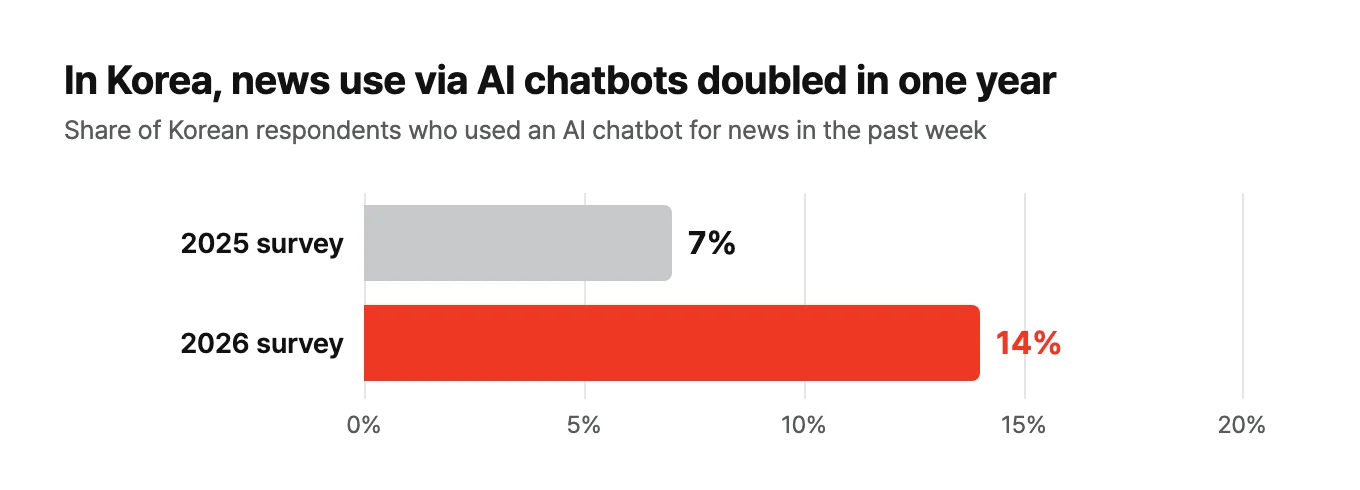
Microsoft's Copilot Daily, Google Gemini's Daily Brief, and the briefing feature (in Korean) in SK Telecom's A. (A-dot) assistant: the big platforms have all launched morning summaries. According to the South Korea chapter of the Reuters Institute's Digital News Report 2026, the share of Korean respondents who used AI chatbots for news doubled in a single year, from 7% to 14% (in Korean).
These services, however, are tuned to the average of millions of users. What a company needs is regulatory notices for its own industry, moves by its own competitors and news about its own clients. No portal puts that on its front page. That is why it is better to build the in-house version yourself, and generative AI has brought the cost of doing so down sharply.
Four things to decide in the design
Before you build, you only need to decide four things.
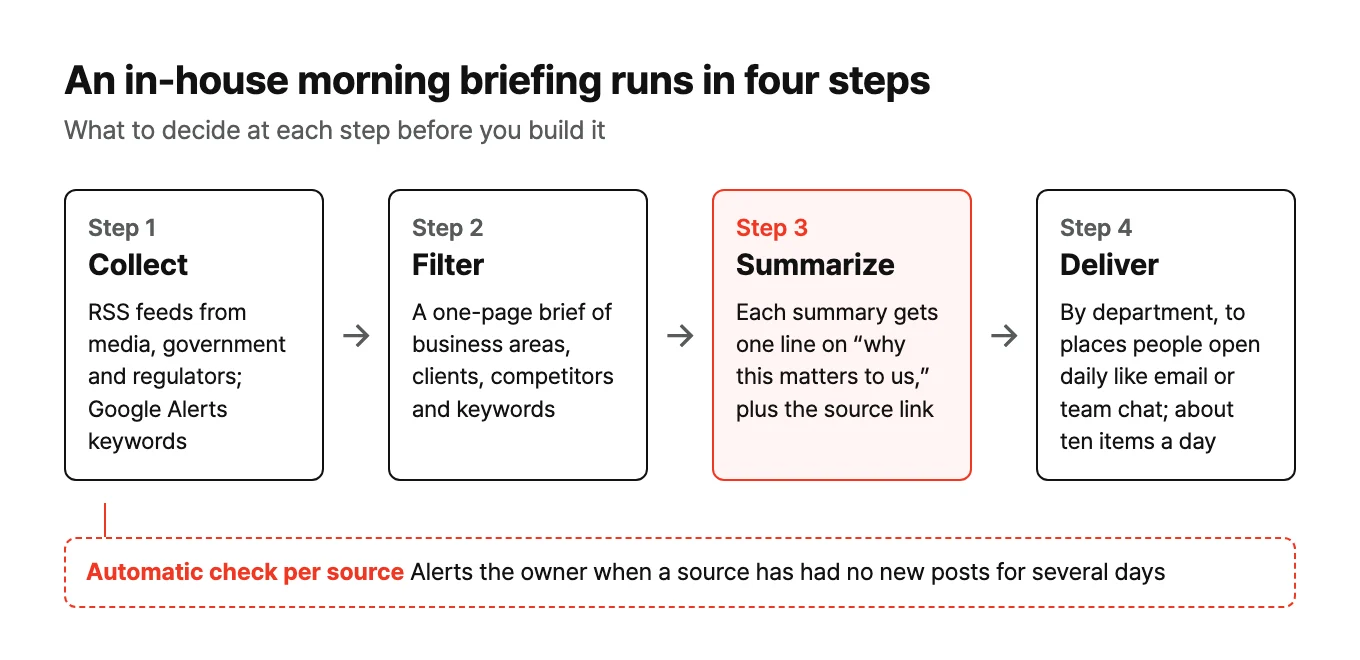
1. Who receives it? Splitting it by department works better than one company-wide briefing. Sales and R&D care about different news.
2. Where does it collect from? Most major media outlets, government ministries, regulators and academic sites offer RSS feeds. For topics without a feed, you can receive Google Alerts keyword alerts as an RSS feed. Let the business teams choose the list themselves.
3. What counts as "relevant" news? Write down the company's business areas, key clients, competitors and keywords of interest on a single page and give it to the AI. For every summary, the AI adds one line: "How does this matter to our company?" Most of an in-house briefing's value comes from that one line.
4. Where does it go? Email, a team chat channel, a short audio clip to listen to on the commute. Send it to places employees already open every day. Asking them to install a new app lowers adoption.
Around ten items a day is plenty. Any more, and it turns back into an inbox.
How each department uses it
| Department | What to monitor | Benefit |
|---|---|---|
| Corporate planning | Industry trends, policy changes, government support program announcements | Decision-making material always at hand |
| Sales | Client and competitor press releases, job postings | Less time spent preparing for meetings |
| R&D | Papers, patents and tech blogs on keywords of interest | No missed technology trends |
| Quality and regulatory affairs | Notices from regulators such as Korea's Ministry of Food and Drug Safety (MFDS), overseas regulatory news | No delays in regulatory response |
The last row in particular is an area where a miss is costly. The fact that notices are not missed even when the person in charge is on vacation is reason enough to adopt it. The same goes for not missing government support program announcements, a topic we covered separately in The government will pay for your AI.
Build the operating model along with it
Building it does not take long. The time goes into what comes after.
The most common failure in this kind of automation is stopping without any alert. When one outlet changes its feed address, only that outlet quietly drops out. The program logs that everything is fine, yet there has been no new item for days. Nobody notices.
So decide the operating model from the start.
- One owner: it does not have to be the person who built it. One person from the business team who reads the briefing every day is enough.
- Automatic checks: set up a "notify if there have been no new posts for several days" alert for each source.
- A monthly review: check with the business team whether the source list and relevance criteria still fit.
How to keep this kind of setup running without dedicated staff is covered in Running AI without dedicated staff.
Three internal rules
The easier summaries have become, the larger the copyright and accuracy issues have grown. In January 2025, Korea's three major terrestrial broadcasters sued Naver, Korea's largest portal, for using their news to train AI (in Korean), and Apple temporarily paused its news summary feature after iPhone notification summaries got BBC stories wrong. Even internal tools need rules.
1. Use only public feeds and materials. Do not scrape sites that block access or bypass paywalls.
2. Summaries stay internal; the full text stays behind the original link. Do not republish summaries in customer newsletters or external channels.
3. Check numbers and quotes against the original. When writing a report based on a summary, always go back to the original. The principles from When AI is confidently wrong apply as is.
We recommend adding each of these three as a line in your AI usage policy.
Rollout order
Weeks 1–2: one person. Start with a briefing for the one employee who does the most information gathering. Refine the sources and relevance criteria.
Weeks 3–4: one team. Send the same briefing to the team channel. Everyone walks into the morning meeting having seen the same news.
Month 2 onward: expand by department. Keep the same structure and swap in each department's sources and criteria. Once you have built one well, the second one is almost free.
Wrapping up
An AI adoption project does not have to be flashy to be a good first one. It just needs to be work someone does by hand every day, where mistakes can be checked right away and the benefit is visible daily. Information gathering fits those conditions well.
Start small, confirm your first success, and choosing the next project becomes much easier.
A hands-on experiment with this topic is written up in My Own Magazine, Every Morning.
References
- Reuters Institute, Digital News Report 2026 — South Korea
- Digital Daily, AI chatbot news use in Korea at 14% (2026-06-18) (in Korean)
- TechCrunch, Microsoft Copilot Daily and payments to publishers (2024-10-01)
- TechCrunch, Gemini app update and Daily Brief (2026-05-19)
- Asia Economy, A. (A-dot) briefing beta (2025-06-30) (in Korean)
- How-To Geek, How to get Google Alerts as an RSS feed
- Electronic Times, Three terrestrial broadcasters sue Naver (2025-01-13) (in Korean)
- 9to5Mac, Apple temporarily pauses notification summaries (2025-01-16)