If AI Tools Are Being Copied Across Every Department: Build the Frame, Not Another Tool
Building a business tool with AI now takes a day. The trouble starts afterwards: every department makes its own copy, and soon nobody knows which version is current. From an AX perspective, this guide covers a design that separates shared parts from variable parts, the principle of leaving calculation to systems and narration to AI, and the questions to ask before you scale a tool out.
The cost of building an AI tool has dropped to almost zero. The cost of managing one, meanwhile, is quietly piling up.
"We already have seven of these"
There is a scene we often see at companies six months into AI adoption.
The sales team builds a proposal draft generator. People use it a lot. Marketing copies it and adapts it for press releases. HR adapts it for job postings, planning for reports. A few months later, there are seven similar tools.
At first, nothing seems wrong. Everyone is using their own tool happily. Then the problems surface one by one.
- The company boilerplate changes, and it has to be fixed in seven places.
- A personal data filter is added, but it only makes it into two of them.
- The person who built a tool leaves, and nobody can fix it anymore.
Thanks to AI, the cost of building has nearly vanished, but the cost of managing grows with every tool you add. It is shadow AI, where employees each use AI on their own, spreading at the level of tools.
Build a frame, not another tool
The fix is simple: separate only the parts that change from task to task, and keep everything else as one.
| Keep shared | Swap per task |
|---|---|
| AI calls and processing engine | Document templates and outlines |
| Personal data and security filters | Task-specific criteria and terminology |
| Output validation rules | Reference material lists |
| Interface and access control | Tone and length |
When a new department wants a tool, you add one configuration file that fills in only the right-hand column. When the company boilerplate changes, you fix it in one place in the shared core. Security filters apply to every task from day one.
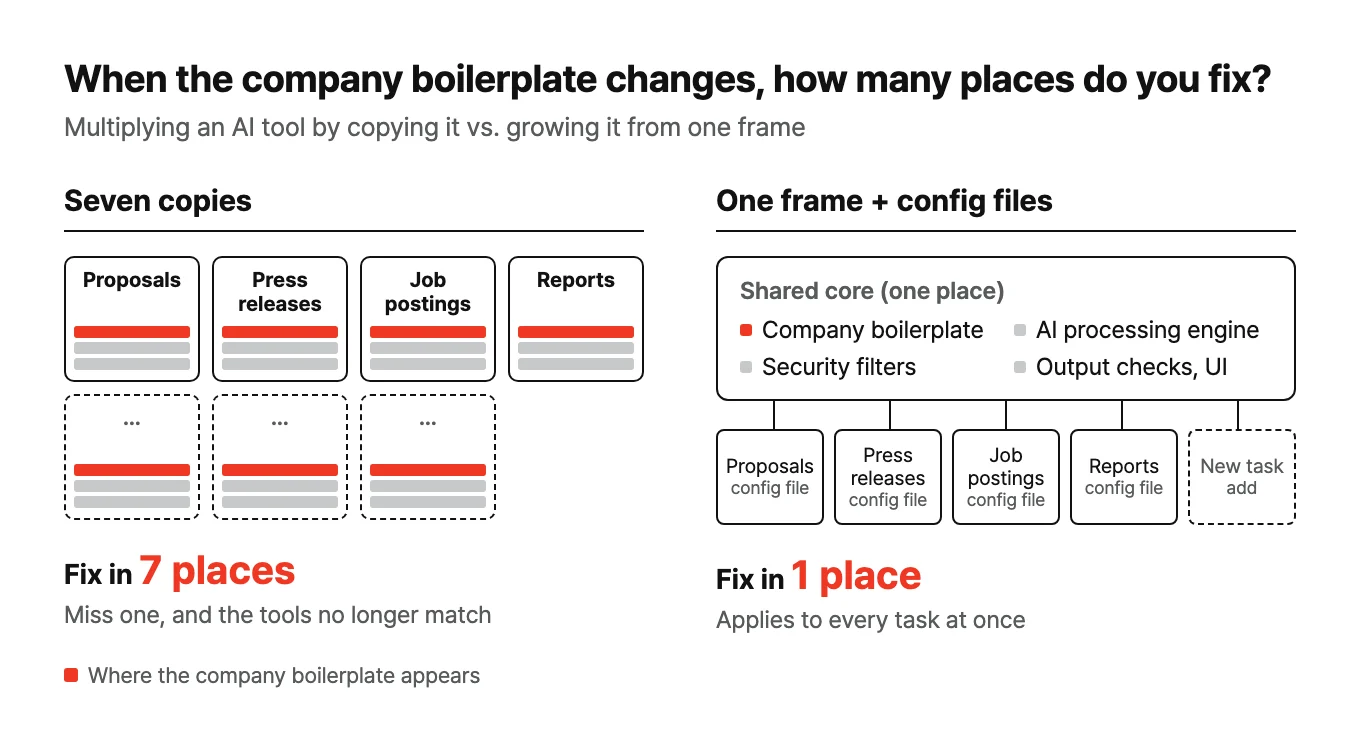
You can change how you ask AI to build tools, too. Instead of "build me another proposal generator," ask: "build a structure where defining one document type in a single configuration file automatically wires up generation, validation and the interface." The goal is a structure where adding a new task means touching only one file.
What AI does best is "one more of the same kind"
There is a reason this design suits the AI era so well.
AI is unusually good at producing one more thing of the same shape to fit a defined frame. Without a frame, it builds from scratch every time, and the output varies a little each time. With a frame, the slots AI has to fill are clear, and quality comes out even.
So even if the first tool takes an extra day to build, from the second one on, it is almost free. Of the scaling strategies discussed in The pilot succeeded. What comes next?, this is the cheapest way to execute "scaling by capability."
Calculation goes to the system, narration to AI
There is one principle to settle while designing the frame: do not hand AI calculations that have a right answer.
Sales totals, unit price calculations, inventory quantities, evaluation scores. Hand rule-based calculations to AI, and the results will vary slightly even with the same input. There is no reason to do that. Let existing systems or code do the calculation, and let AI do only the job of interpreting those results and writing them up in sentences people can read.
| What the system does | What AI does |
|---|---|
| Totals this month's sales | Explains what the change from last month means |
| Calculates the quote amount | Writes the explanatory text for the quote |
| Computes evaluation scores | Writes feedback on the combination of scores |
Keep this boundary, and results stay stable. When something is wrong, you can find where it went wrong right away. Blur the boundary, and the problem covered in When AI is confidently wrong creeps into your numbers.
A frame also makes fixes easier
A frame is not only good for scaling up.
When you incorporate feedback from the business teams or a regulation changes, a frame means fixing one place. With seven copies, you fix seven times and miss one of them.
The scope of a fix becomes clear, too. If only one task's template needs to change, you edit that task's configuration file. If the problem spans every task, you fix the shared core. Knowing in advance how far a change will reach is the biggest difference between copies and a frame.
That said, appearance and validation are different problems
Once a frame is in place, you can stamp out plausible-looking output as much as you like. Here lies the trap: looking plausible and actually being right are different problems.
Services that use AI to evaluate people have already run into real trouble. In a 2022 audit by outside researchers, two AI personality analysis services used in hiring produced substantially different personality scores for the same person when only the resume format (PDF or text) or the input source (resume or LinkedIn) was changed, and the researchers concluded they could not be considered valid testing instruments. As cases like this accumulated, New York City made annual bias audits mandatory for automated hiring tools, and the EU classified AI used in hiring as high-risk under its AI Act. In Korea, too, responsibility for high-impact areas has grown since the AI Basic Act, Korea's framework law on AI, took effect.
So sort the tasks you put on the frame by risk.
- Tasks you can add right away: work a person checks at the end, such as drafting, summarizing and polishing copy.
- Tasks to add after validation: documents that go to customers as is, and documents tied to contracts or quotes.
- Tasks that must not go on without expert validation: hiring, evaluation and selection, and medical or financial judgments, where people or money carry real weight.
Even tools built from the same frame need a different level of validation when their purpose changes. The moment a tool built for internal reference starts being used for hiring or evaluation, it needs an entirely different level of validation. Write down each tool's permitted uses from the start.
Three checks before you scale
Once you have built an AI tool, ask three questions before copying it.
1. How many more similar tools will we build? If it is three or more, build the frame first.
2. What is shared, and what is task-specific? Try filling in the two-column table above. If it is hard to fill in, you do not yet understand the work well enough.
3. Who manages the shared core? If nobody manages the frame, the frame eventually becomes just another copy. As discussed in Building AI in-house vs. outsourcing, the shared core is better kept in-house.
Wrapping up
The faster AI lets you build, the more the difference comes down to how cheaply you can build the second one. Build one well and turn it into a frame, and you can run many tools with the effort it takes to build one.
And the bigger the frame, the clearer the boundaries should be. What the system calculates and what AI writes; which tasks must be validated before they go on the frame. These boundaries separate organizations that stay in control as their AI tools multiply from those that do not.
A hands-on experiment with this topic is written up in I Built One Psych Test, and It Became Twenty.